[Home] [Overview] [Developer] [Manual]
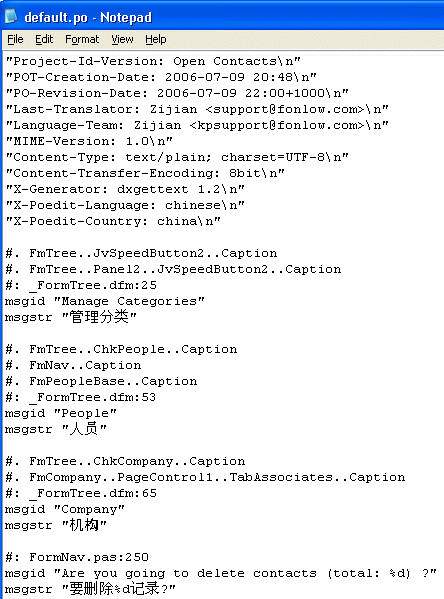
It is straightforward to translate the user interfaces with a free and sophisticated tool called PoEdit, that could be obtained from http://www.poedit.net/. The PO file is in "locale\en\LC_MESSAGES" of TranslationResources.zip.
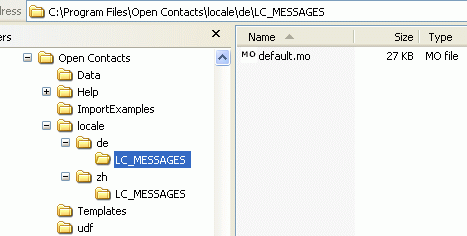
When Open Contacts starts running, it will try to locate a language resource file "default.mo" in a sub-folder as illustrated below, if your computer is running Windows in German language. "default.mo" used by Open Contacts was compiled from "default.po".
Open Contacts will pick up translations from the MO file.
After opening the PO file with PoEdit, you might get a screen like this.
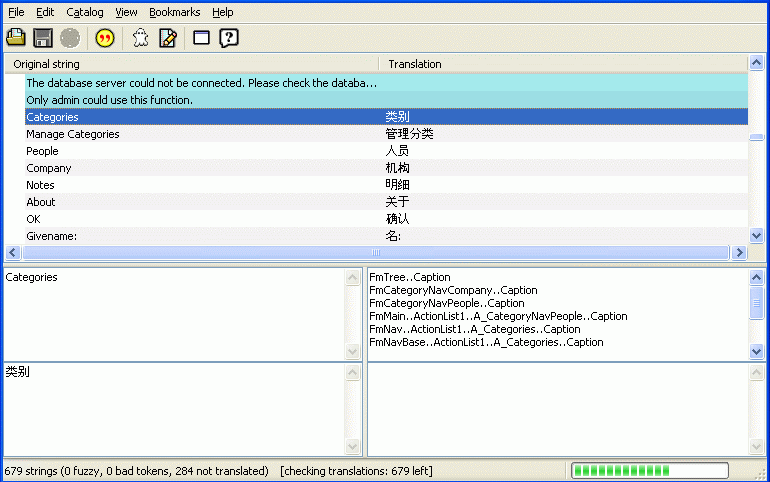
Input translations into the bottom-left box. By default, lines in blue represent texts not translated, and lines in white represent translated texts, and lines in yellow represent fuzzy translations.
After getting enough texts translated, you may press the Save button to save translations and by default generate the MO file that is saved in the same folder. To make Open Contacts know where to locate the MO file, you need to create a proper directory structure, as explained following.
In a screenshot above, directory "de" indicates that German translation is here. For Spanish translation, the folder name should be "es", or "es_PR". PR represents country Qatar. Thus, the directory name is language code, or language code plus country code connected with an underscore. For more details, please refer to ISO 639 language codes and ISO 3166 country codes.
Note
Some segments of the original texts should not be translated. For example, if you see original texts like "%d record(s) added;", you should leave "%d" as it is. Another similar segment is "%s".