[Home] [Overview] [Developer] [Manual]
An address book program in modern days is not a standalone program for storing contact info electronically only, it should also interact with other applications to construct efficient contact management. Rather than doing copy/paste data to other programs, the users should be able to use shortcuts to create Emails, make phone calls or open web links using contact data.
Almost all address book programs available can store the following group of contact info:
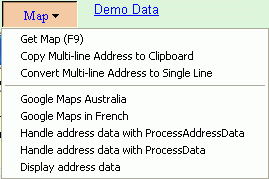
With its flexible structures, Open Contacts can store all kinds of contact info as you can create unlimited custom data fields, and such data fields can be associate with field type and field action. A field action is associated with a built-in function. For example, a field of action type "email" is associated with Email programs, and a field of action type "phone" is associated with telephony. When you focus on a field, the Action button will be transformed to present functions available for the field value. Users then can use contact data with other applications seamlessly. Here's a summary of built-in functions of interacting with applications.
While the built-in functions have covered most contact data that can be associated with computer programs, it will be good to allow custom actions to be associated with custom fields.
For example, some small business operators might want to store tax file numbers of customers, and the tax file number can be used to check detailed info through web services provided by the tax office. The services allow URL query with a tax file number. Thus, it will be ideal to ask Open Contacts to start the URL query with the highlighted tax file number of a contact. In addition, you might have some other desktop applications of taxation that can take one parameter of tax file number.
Open Contacts provides interfaces of developing custom plug-in programs for such goodies. With the interfaces, you may develop custom actions for custom fields using URL queries, Windows script, dll program and EXE programs.
To enable the plugin programs, please go to [Options -> Applications -> Enable Action Plugin].
An Open Contacts plugin works upon the data of current dynamic data field, providing the Action button with extra menu items. Each of such menu items may trigger a program which take the field data as parameter.
Each plug-in for a custom field is contained in a folder, and all plug-ins are stored under a parent folder called "ActionPlugin". Each plug-in may contain one or many programs that take one parameter for execution. Folder "ActionPlugin" is located under the program folder
The screenshot below illustrates the basic storage of plugins.
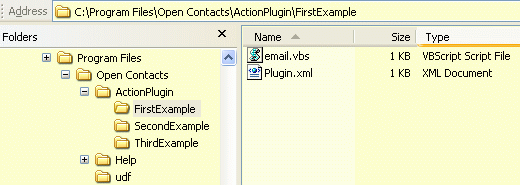
Each plugin includes one manifest XML file and optional programs. The manifest file defines basic info of the plugin and pointers to programs as shown below.
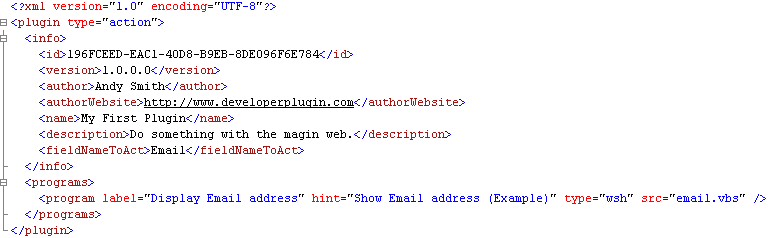
Element or Attribute Description info/fieldNameToAct Fields with the field name indicated by the element data will be associated with the plugin. info/actionTypeToAct Fields with the field action type indicated by the element data will be associated with the plugin. programs/program Each plugin may have multiple programs, each of which may take one parameter. program/type There are 4 types of program: url, wsh, exe and dll. A program of type "url" have 2 attributes associated: urlHead and urlTail. A program of other types has an attribute associated: src. program/urlHead A program of type "url" represent a web service that accepts URL queries. A query of the web service can take one parameter of a field value which will be inserted at the middle of the URL string. The field value is appended to the value of attribute "urlHead". program/urlTail The value of attribute "urlTail" is appended to the field value. program/src The value of attribute "src" points to a local program file located in the plugin folder. program/func If the value of attribute "src" is "dll", the value of func indicate which function to call. program/label The program will be represented in the drop down menu of the action button. The value of attribute "label" will be the text of the menu item. program/hint The value of attribute "hint" will be the hint of the menu item. program/scriptOptions If the program type is wsh, this will be used as the options for Windows Script Host. program/local Indicate whether the local program is located in the plugin folder. This attribute applies to program types exe and dll.
The other elements are not used currently by Open Contacts directly, however, it is good practice to have these elements as references.
There are many web services that allow a single URL query to retrieve info through web browser. Google Maps and Wikipedia are good examples. With Google Maps, you may use URL like http://maps.google.com.au/?hl=en&q=37%20Helen%20St,%20Lane%20Cove to get the map of address "37 Helen St, Lane Cove" in Australia. In this case, the urlHead is http://maps.google.com.au/?hl=en&q=, and the urlTail is empty, so you may define element program like
program label="Google Maps Australia" hint="Open Google Maps for Australia" type="url" src="" urlHead="http://maps.google.com.au/?hl=en&q=" urlTail="" /><
In the XML definition, the escape for question mark ? is "&". When you click on the action menu item "Google Maps Australia" with address"37 Helen St, Lane Cove", you will see Open Contacts actually send URL as http://maps.google.com.au/?hl=en&q=%33%37%20%48%65%6C%65%6E%20%53%74%2C%20%4C%61%6E%65%20%43%6F%76%65 through Windows' default Web browser, this is because for the data consumed by URL, Open Contacts always convert the data into UTF8 representation. Thus, even if your address is with non-English characters, the URL should work well if the web service you consume is good at handling Unicode.
For those web services that partially support Unicode, you may need to write program to convert the data fitting the specification of the web services, and then send URL. For example, you may have a Windows Script Host program or an EXE program that can take one command line parameter, then convert the parameter, then send URL.
You may write vbscript or javascript programs for Windows Script Host. In the example manifest below, a vbscript file is used to open a KML file with Google Earth, and instruct Google Earth to play.
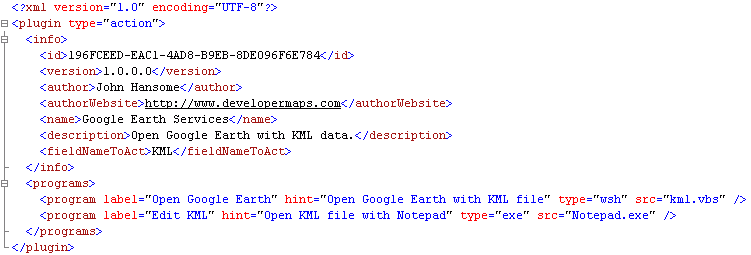
The vbscript takes on command line parameter which is the KML file.
GEAgent = WScript.CreateObject("GoogleEarth.ApplicationGE")Set
GEAgent
.OpenKmlFile WScript.Arguments(0), 0Set
TourControl = WScript.CreateObject("GoogleEarth.TourControllerGE")TourControl
.PlayOrPauseWhen the user click on field KML and then click on the menu item "Open Google Earth" of the Action button, Open Contacts will run kml.vbs with a parameter of the KML file name. Google Earth needs a full path file name of the KML file. If you store KML files inside the default Files folder, you have better to make sure that the KML field is also type "file", thus, file name without path will be assumed to be located in the default Files folder, and the vbscript will get the parameter of a full path file name. For example, the default Files folder is "C:\MY Documents\MyOCFiles", and the KML field value is "sydneymaryst.kml", then the parameter to the vbscript will be "C:\MY Documents\MyOCFiles\sydneymaryst.kml".
Of course, if you always store the absolute path of a KML file, you don't need to define KML fields with the file type.
Open Contacts always run Windows Script Host (cscript.exe) with the Start-in folder at the plugin folder.
The way of using EXE program is similar the way of using vbscript. Attribute "local" indicates the exact location of the exe file if the value of attribute "src" does not contain an absolute file path.
Value 0 represents that the value of attribute "src" has a absolute file path, 1 indicates that the program is in the plugin folder, 2 represents that the program is in a relative file path sharing the same drive letter with Open Contacts program. Such management is to support portable usage of Open Contacts and its plugin programs.
Please have a look at examples below:
program label="Edit KML" hint="Open KML file with Notepad" type="exe" src="c:\somewhere\inAFolder\MyProgram.exe" local="0" /><
The value of "src" should has absolute path for Open Contacts to locate the file. If the value of "src" has no absolute file path, Open Contacts will try to locate the program in Windows search paths.
<
program label="Edit KML" hint="Open KML file with Notepad" type="exe" src="MyProgram.exe" local="1" />Open Contacts will locate the program in the plugin folder.
<
program label="Edit KML" hint="Open KML file with Notepad" type="exe" src="Somewhere\InPortableDrive\MyProgram.exe" local="2" />If Open Contacts program is located in drive K, the Open Contacts will locate the program at "Somewhere\InPortableDrive\MyProgram.exe".
Open Contacts may also talks to DLL programs which export functions as defined below:
Delphi:
procedure ProcessData(data : PWideChar);
procedure ProcessAddressData(Address, ExtAdr, Street, Suburb, City, State, Zip, Country, Geo : PWideChar);
C:
void ProcessData(LPCTWSTR data);
void ProcessAddressData(LPCTWSTR Address,LPCTWSTR ExtAdr, LPCTWSTR Street, LPCTWSTR Suburb, LPCTWSTR City, LPCTWSTR State, LPCTWSTR Zip, LPCTWSTR Country, LPCTWSTR Geo );
When Open Contacts calls ProcessData, the current highlighted field value will pass to the function. When calling ProcessAddressData, Open Contacts will organize address data of current section.
The location of the dll file must be in the plugin folder. If you would prefer storing the plugin program somewhere, you may construct the one in the plugin folder as proxy which will delegate the jobs to other programs.
Remark
For each dynamic field, only one plugin will be associated. If you have more than one plugin working on the same field, you may consider merging the plugin by merging the manifest files and put relevant files into the same plugin folder.
Note
It is assumed that you are computer literate and have some programming skills. And we don't run training courses or supports for how to write URL queries, windows scripts, exe or dll programs.
Appendix
The plugin programs that come with the original package of Open Contacts provide extended functions some of which are for demonstration only.
EmailField -- Work upon Email field. There are 1 vbscript program and 1 dll program with this plugin.
KMLField -- Work upon KML field which store KML file. The vbscript program can launch Google Earth with the KML file and direct Google Earth to play the KML data. You need Google Earth v4.1.7087.5048 or above to play with this plugin.
PhoneAction -- Work upon fields of action type phone. You will see both the Phone field and the Mobile field can use this plugin to dial via Skype. The Vbscript associated will add "00" as a prefix to an existing phone number as Skype requires "00" to dial to conventional phones.
MapAction -- Work upon field of action type map. You will see different ways of calling dll functions. The package also include shortcuts to Yahoo Maps and Microsoft Live Maps.